Build a kinesiologist website that earns trust and makes booking easy
Whether you’re just starting out as a kinesiologist or looking to replace an outdated website, this guide shows you how to build a professional, well-organised site that’s easy to manage. You’ll also see how Webfolio can take care of much of the work for you, with no technical skills required.


Why create a website as a kinesiologist?
When someone is looking for a kinesiologist, they usually want to know who you are, what you offer, where you’re based and what to expect from their first appointment. They also want to see whether your experience and approach feel right for them.
A well-designed website gives people one reliable place to find those answers. Instead of piecing together information from social media, your Google Business Profile, booking platforms and professional directories, they can explore your practice in a space you control. That makes a real difference to first-time visitors.
A good website can help you:
- Introduce your practice: explain your approach, background, qualifications and how you work.
- Explain your services: give visitors clear information about “initial kinesiology session”, “follow-up session” and the other services you actually offer.
- Build confidence: share your training, photos of your practice and genuine testimonials where appropriate.
- Make booking easier: let visitors check your prices and availability and book directly.
- Become more visible locally: publish relevant pages for people searching for a kinesiologist in your town or region.
Your website also gives people who hear about you through word of mouth somewhere to learn more. They can find practical information, understand what happens during a consultation and get in touch without having to call first.
A website won’t automatically bring in new clients or put you at the top of Google. It does, however, give your practice a professional home online, making it easier for people to find you, learn about your work and take the next step towards booking.
Building a kinesiologist website is about more than choosing a design. You need the right pages, useful content, a reassuring presentation, straightforward booking and a sound foundation for visibility on Google, Bing, ChatGPT and other discovery tools.
Create your site by answering a few questions: free for 14 days, no credit card.
Essential pages for a kinesiologist website
Your kinesiologist website doesn’t need dozens of pages or a futuristic, overly complicated interface. In fact, that can work against you. What matters is putting the right information in the right place.
Someone looking for your prices shouldn’t have to read your entire biography to find them. Equally, a first-time visitor should be able to understand your approach before having to browse a long list of services.
With Webfolio, you don’t need to map out the site yourself. Using the information you provide about your practice, it prepares the main pages and organises your content.
Here are the pages worth including.
- 01. Essential pages for a kinesiologist website
A clear, welcoming homepage
Your homepage should make it immediately obvious who you are, what you do, where you work and how to contact you.
A heading such as “Kinesiologist in Bordeaux — Appointments and Practical Information” is more useful than a vague slogan that tells visitors nothing about your profession or location.
Introduce your approach in a few sentences, add a professional photo and highlight your main services. Make sure your location and appointment options are easy to find, too.
A clearly visible booking button near the top of the page lets interested visitors take the next step straight away.
With Webfolio
Your home page is prepared from the information you give about your practice. You can then change the text, the images and the layout to match your identity.
- 02. Essential pages for a kinesiologist website
A Services page that explains what you offer
Your services page is especially important because people discovering your practice may not know exactly what to expect.
Depending on your work, you might include:
- initial kinesiology session;
- follow-up session;
- stress management session;
- one-to-one support;
- session explaining your approach;
- group workshop.
Ideally, every service should have a description, duration, price and a clear explanation of what the appointment involves.
For example, instead of simply listing “Initial kinesiology session”, explain what it involves, how long it takes and whether clients need to prepare anything in advance.
With Webfolio
You can organise your services, add descriptions, set their duration and price, and decide which ones visitors can book online.
- 03. Essential pages for a kinesiologist website
An About page that tells your story
Before booking, many visitors want to know who they’ll be meeting.
Your About page is where you can share your background, training, qualifications and what makes your work as a kinesiologist distinctive.
You can explain what drew you to the profession, the training you’ve completed and what matters most in your work: your methods, training and the limitations of your practice.
Be personal and specific rather than relying on generic claims. Verifiable training details and a real photo of you often inspire more confidence than sweeping promises about the benefits of your methods.
With Webfolio
Your background, training and certifications can be presented on a dedicated page that you complete over time.
- 04. Essential pages for a kinesiologist website
A photo gallery that shows people your space
Photography plays a part in how people perceive your practice.
A few photos of your consultation room, reception area or workshop space give visitors a sense of where they’ll be welcomed.
You can also show practical aspects of your work, such as equipment used during sessions or how you prepare your space, while always protecting client confidentiality.
Choose genuine photos of your workplace wherever possible. Stock images can support your visual identity, but they don’t replace real pictures of your practice or reception area.
With Webfolio
You can create a photo gallery, sort it into albums and add captions to the pictures.
- 05. Essential pages for a kinesiologist website
An Articles page where you can share your expertise
An articles section or blog can help you explain your work, answer common questions and share useful information with people considering an appointment.
For example, you could write about:
- what happens during a first session;
- common questions about muscle testing;
- the limits of your approach;
- the difference between kinesiology and physiotherapy;
- questions worth asking before a first session;
- relevant training and qualifications in your profession.
These articles can help visitors understand your approach while gradually strengthening your site’s organic search visibility.
A handful of accurate, well-researched articles will usually serve you better than a large collection of shallow posts.
With Webfolio
You can publish articles and educational content on your site, alongside the pages about your practice.
- 06. Essential pages for a kinesiologist website
A Contact page with all the practical details
Your Contact page should make reaching you straightforward.
Depending on what you want to share publicly, include your phone number, email address, business address, opening hours and a contact form.
If you see people at a practice location, directions or a Google Maps link can help them plan their visit.
If you also offer video appointments or home visits, make those options clear to avoid confusion.
With Webfolio
The contact details, hours and practice locations you enter when creating your website are automatically reused in the relevant sections.






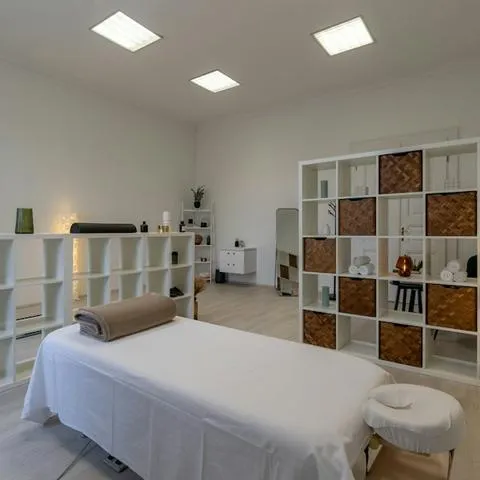






A structure prepared for your practice, to adapt at your own pace.
Let clients book appointments online
When someone wants to book, they should be able to find the right service, see the price and choose a suitable time without any fuss.
Without online booking, they may need to call, wait for a reply or exchange several messages before finding an available slot.
Webfolio includes a built-in booking system on your kinesiologist website. There’s no external plugin to install and no additional subscription required. If you’d rather not use online booking, simply switch it off in your dashboard.
- 01. Online appointment booking
A booking button that’s easy to find
You can place a “Book an Appointment” button beside your services and on other key pages.
You can also show your available days and the date of your next open slot.
That way, visitors can start booking without having to search for your contact details or leave your website.
- 02. Online appointment booking
Let visitors choose the service and location
Visitors start by selecting the service they want: initial kinesiology session, follow-up session, stress management session or any other service you’ve made available to book.
They can check the duration and price, then choose from the locations or formats you offer: at your practice, at home or online.
You decide which services can be booked, so you stay in control of your schedule.
- 03. Online appointment booking
Availability that works around your schedule
The booking calendar shows available slots based on the hours and rules you’ve set.
You can use your regular opening hours or set specific booking times, require a minimum notice period and leave a buffer between appointments.
This flexibility is particularly useful if you split your time between one-to-one appointments, travel and other parts of running your practice.
- 04. Online appointment booking
Automatic confirmations and reminders
Once an appointment is booked, the person receives an email confirmation with the essential details.
Reminders can also be sent before the appointment, including 24 hours and 3 hours beforehand.
Clients can review their booking details and, subject to the rules you set, cancel online.
- 05. Online appointment booking
One calendar to manage your day
All bookings appear in the calendar in your Webfolio dashboard.
You can see what’s coming up, block out time and update your availability.
This gives you a clear overview of your schedule without juggling several different booking tools.
Online booking is included in every plan, including the free trial.
How to build trust through your kinesiologist website
Trust matters when someone is deciding who to work with.
Training, areas of expertise and ways of working can vary considerably from one professional to another.
Your website should help visitors understand what makes your approach different.
A few key elements can help establish that trust.
Share your training and qualifications
Your training matters to people considering their first appointment.
State where you studied, which courses you completed, how long they lasted and the qualifications you actually earned.
If you’ve completed additional training related to your work, include the provider, what the course covered and the skills you developed.
Private certifications should not be presented as medical qualifications or official accreditation if they are not.
With Webfolio
You can highlight your professional background and certifications on your About page.
Display genuine testimonials
Testimonials can give new visitors a sense of what it’s like to work with you.
They might mention how welcoming you are, how well you listen, the clarity of your explanations or the experience of attending an appointment.
Only publish genuine feedback with the appropriate consent, and never present testimonials as proof that your approach has medical benefits.
With Webfolio
You can add testimonials to your website to complement the information about your practice.
Explain what happens at a first appointment
Someone who’s never visited a kinesiologist may hesitate simply because they don’t know what to expect.
Explain what the first appointment involves, how long it lasts and what kinds of questions you may discuss.
For instance, you could walk visitors through an initial kinesiology session: how you welcome them, any questions you ask beforehand, what happens during the session and any information you provide afterwards, depending on how you work.
The clearer you make the process, the less guesswork people have to do before booking.
With Webfolio
Each service appears on your website with its description, duration and price.
Show visitors your workspace
Real photos help prospective clients picture their visit.
You could include your reception area, consultation room and the equipment you use in a photo gallery.
Showing what your professional space looks like makes your practice feel more tangible, especially to people discovering it for the first time.
With Webfolio
Your website includes a gallery where visitors can open your photos in full size.
Highlight workshops and events
If you host workshops, talks or meetups related to your work, you can feature them on your site. If you don’t run events, simply leave this section disabled.
For each event, include the topic, date, location, duration and price.
This gives visitors a glimpse of what you offer beyond individual appointments and gives them a reason to return to your site.
With Webfolio
You can feature events in dedicated sections with all the practical details.
Answer questions from prospective clients
Before booking, many people wonder about the same things: How long is an appointment? Do I need to prepare? Should I bring anything? What appointment options are available?
An FAQ answers these questions on your site. It can reassure people who are still unsure and save you from repeating the same information by phone or message.
Keep your answers concise and measured. If your work is not part of a regulated healthcare profession, make the limits of your support clear.
With Webfolio
Webfolio drafts an initial FAQ from your questionnaire answers and displays it on your site. You can then add, edit and reorder questions in your dashboard, or generate more with AI.
Your legal notices also have their own dedicated pages, which you can edit whenever you need to.

Webfolio already has space for the details that help build trust. All you need to do is make them your own.
A fast, secure, SEO-ready kinesiologist website
A website’s quality isn’t just about how it looks.
Loading speed, mobile usability, security and the way pages are presented to search engines all matter.
With a general-purpose website builder or a self-hosted WordPress site, some of this may require technical configuration, plugins or help from a developer.
Webfolio handles much of the technical groundwork, leaving you free to focus on your practice.
Hosting included, with no server setup
Hosting is what keeps your website accessible online.
Your site is delivered through Vercel’s network, which caches pages and images to help them load quickly.
You get a hosted solution without having to manage your website’s underlying infrastructure yourself.
With Webfolio
There’s no need to find a hosting provider, configure a server or handle infrastructure updates yourself.
A domain name for your kinesiologist practice
Your domain name is your website’s address, such as www.camille-roux-kinesiologue.fr.
For an independent practice, your professional name, perhaps paired with “kinesiologist”, can be a sensible choice.
A short, memorable domain that fits your professional identity is usually better than a long string of keywords.
Extensions such as .fr, .be or .com may be worth considering depending on your country and audience.
With Webfolio
You can start with a webfolio.com address and connect your own domain later.
A secure HTTPS connection
HTTPS encrypts the data exchanged between a visitor’s browser and your website.
With Webfolio
Your HTTPS certificate is provided and renewed automatically, including when you use a custom domain. There’s nothing to install or renew manually.
Images optimised for every screen
Large image files can slow down your pages, especially on mobile phones.
With Webfolio
Images are optimised and delivered in formats suited to different browsers and screen sizes. You can display your professional photos and gallery without needing to understand image compression.
Search-friendly page titles and descriptions
Every page on your kinesiologist website includes elements that matter for SEO, such as an SEO title and meta description.
These help search engines understand what each page is about and may influence how it appears in search results.
For a professional in Bordeaux, “Camille Roux — Kinesiologist in Bordeaux” tells people more than a generic “Home” title.
The aim is to give each page a clear identity that reflects its content.
With Webfolio
SEO titles and meta descriptions are generated from your website’s information, and you can customise them afterwards.
Structured data that describes your practice
Structured data gives search engines information about your practice in a format they can understand.
It makes your website easier for search engines to interpret, although it doesn’t guarantee any particular display in Google results.
With Webfolio
Webfolio automatically describes your business, address, opening hours and certain service details using Schema.org, the standard format understood by Google and Bing.
An automatically generated sitemap
A sitemap is a file listing your website’s main URLs to help search engines discover them.
With Webfolio
Your sitemap updates automatically when your pages change, and compatible search engines, including Bing, are notified of certain updates through IndexNow. During your free trial, your site is hidden from search engines; it becomes eligible for indexing once your subscription is active.
Hosting, HTTPS, optimised images, SEO titles and structured data are all included, with nothing to configure.
How to improve local SEO for your kinesiologist website
Technical optimisation lays the foundation, but it can’t guarantee strong search visibility on its own.
For a locally based practice, it’s essential to explain clearly what you do, which services you offer and where you work.
People might search for “kinesiologist in Lille”, “initial kinesiology session in Lyon” or “kinesiologist in Brussels”.
To meet those needs, your website should provide useful, sufficiently detailed information.
You can also:
- create or update your Google Business Profile, if you’re eligible;
- keep your contact details and opening hours consistent everywhere you appear online;
- write original descriptions for each of your services;
- publish genuinely helpful educational articles;
- earn links from partners or organisations that are genuinely connected to your work;
- use Google Search Console to monitor how your website performs in search results.
Organic search visibility develops over time. A solid technical setup helps, but content relevance, local competition and the quality of your online presence are just as important.
Ready to create your kinesiologist website?
Enter the name of your practice and where you see clients: Webfolio prepares your pages, your services and your online booking in a few minutes.
Keep your kinesiologist website up to date without technical skills
A professional website shouldn’t be static or left to go out of date.
You might change your prices, introduce a service, adjust your availability, complete more training or announce an event.
You should be able to reflect these changes on your website easily, without hiring someone or paying extra for routine updates.
- Reason 1
Give visitors information they can rely on
Outdated prices, incorrect opening hours or an old address can easily cause confusion.
Keeping your details current helps visitors plan their appointments with accurate information.
- Reason 2
Maintain a consistent online presence
When something important changes, update it on your website, Google Business Profile and any other channels you use.
Consistency helps visitors understand your practice and prevents conflicting information across different platforms.
- Reason 3
Show how your practice is evolving
New qualifications, upcoming workshops or additional services all deserve a place on your website.
Regular updates show that your practice is active and evolving, without requiring you to rebuild your site every time something changes.
Easily update your website yourself with Webfolio
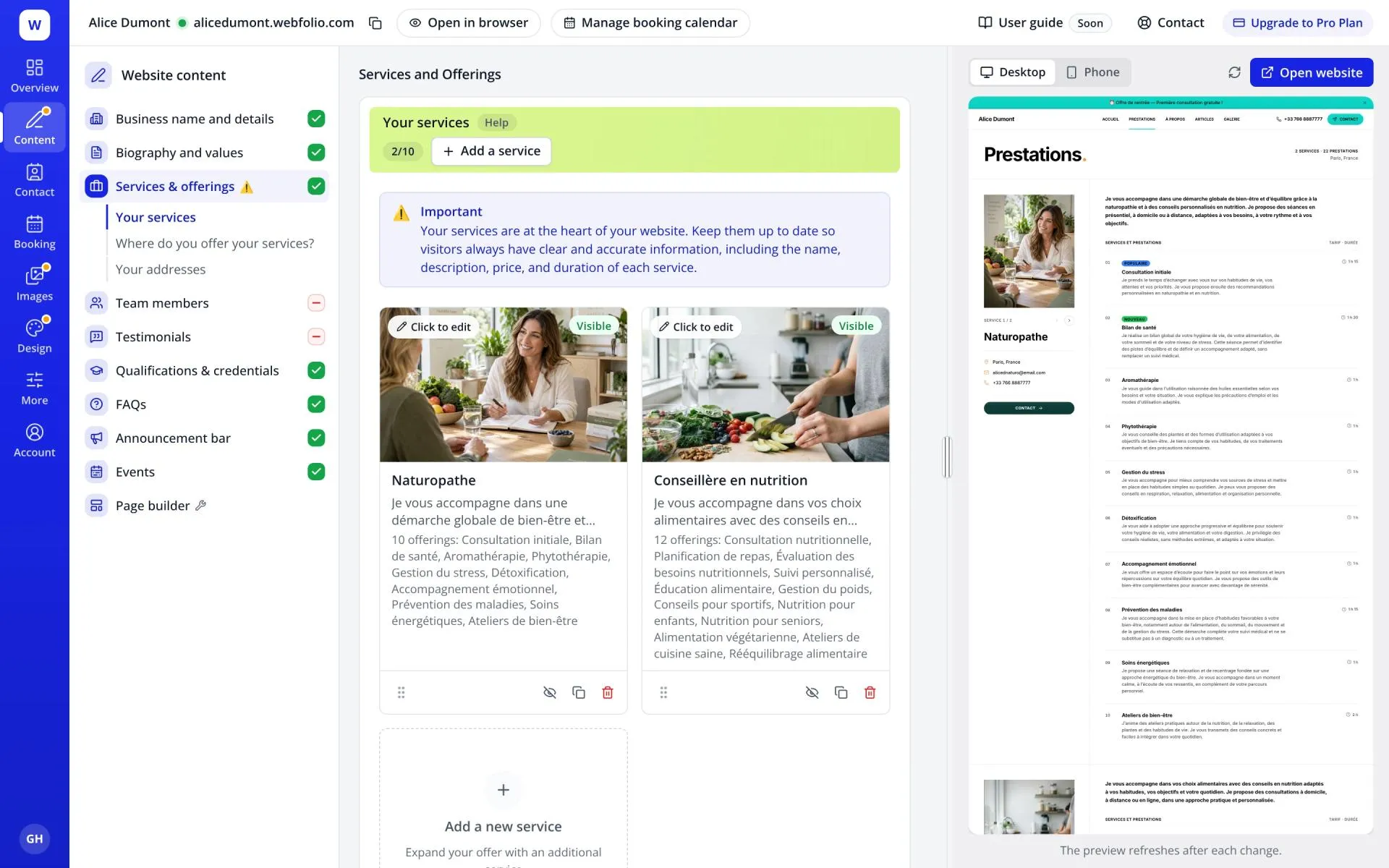
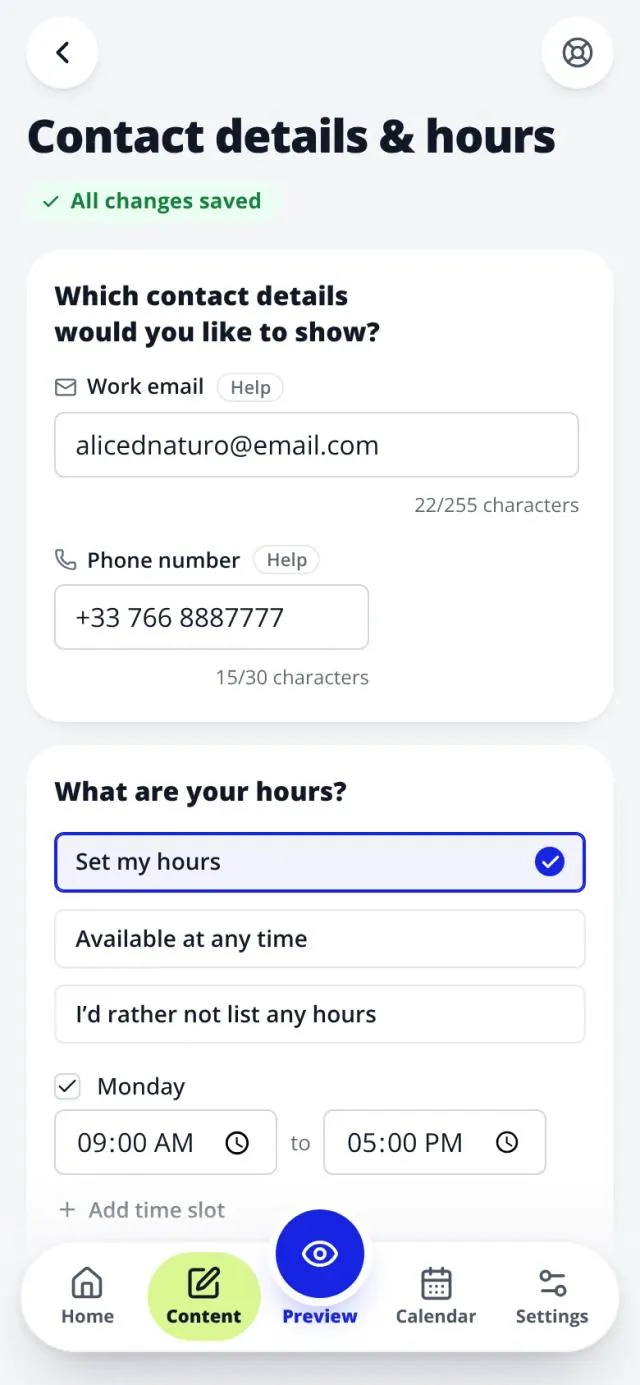
Manage your content from one dashboard
Webfolio gives you access to your website’s key information through a single management interface.
You can edit your copy, contact details, services, prices, opening hours, photos and selected design elements.
You don’t need to touch your website’s code to make these everyday changes.
Preview changes as you go
Your dashboard lets you preview your website on desktop and mobile.
You can see how your edits look and fine-tune the presentation as you go.
Manage your website from your phone
Need to correct your opening hours between appointments or update a service while you’re away from your computer?
Webfolio’s interface also works on smartphones, making everyday changes easier when you’re on the move.
Update your website whenever you need to, from your computer or phone.
How to create your kinesiologist website with Webfolio
A traditional website builder usually means choosing a template, deciding how many pages you need and what goes on each one, configuring navigation menus, then writing and formatting all your content.
That approach gives you plenty of freedom, but it also takes time and involves many decisions that have little to do with your actual profession.
Webfolio takes a different approach.
You answer a few questions about your kinesiologist practice, and Webfolio uses your responses to prepare a first version of your website.
Here’s how it works.
- 01. Build your website with Webfolio
Tell us about your practice
Start by entering your practice name or professional name, then select your profession: kinesiologist.
Webfolio uses this information to tailor the website setup to your line of work.
You don’t need to write a project brief or know anything about web development.
- 02. Build your website with Webfolio
Choose your services
Select the suggested services that genuinely reflect what you offer.
For example, you might choose “initial kinesiology session”, “follow-up session” or other services relevant to your practice.
You can then add descriptions, durations and prices for each service.
Webfolio arranges everything into a consistent layout, so you don’t have to design each service listing yourself.
- 03. Build your website with Webfolio
Tell visitors where you work
Specify whether you see clients at a practice location, make home visits or offer remote appointments.
You can select more than one option if that reflects how you work.
If you work from a practice, add your business address so it can appear on your website.
- 04. Build your website with Webfolio
Set your working hours
Enter the days and times when you’re available.
This allows visitors to see your hours and can also provide the starting point for your online booking schedule.
You can change these settings later as your schedule evolves.
- 05. Build your website with Webfolio
Choose your website’s look and feel
Webfolio offers a selection of visual styles to suit your professional identity.
A clean, easy-to-read design is usually a good fit for a kinesiologist website, but you’re free to choose colours that feel right for your brand.
You can personalise the site further by adding photos and adjusting other design details.
- 06. Build your website with Webfolio
Get your first draft and make it yours
Once you’ve completed the questionnaire, Webfolio builds your website using the information you’ve provided.
You’ll have an initial site structure with the key pages, your services and your professional details already in place.
Review the wording, check the information and add anything else you think is needed.
After that, you can keep updating your website through the dashboard without starting over.
A 14-day free trial, with no credit card and no technical skills needed.
Mistakes to avoid when creating a kinesiologist website
A professional website should present your work clearly, credibly and in line with the rules that apply to your communications.
A few precautions are particularly important in your field.
Making therapeutic claims
Avoid presenting your approach as a treatment that can cure disease or replace medical care.
Describe the services you actually provide without claiming clinical outcomes that have not been established.
You can explain your methods and their purpose while making a clear distinction between your services and medical treatment.
Describing training in a misleading way
Professional titles, training and requirements to practise are not necessarily the same in France and Belgium. Some titles do not refer to regulated healthcare professions.
Describe your training accurately: the provider, course duration and any certificate you received.
Avoid wording that could imply medical qualifications or official recognition you do not have.
Publishing misleading testimonials
A client review can be useful for showing how you welcome people and what it is like to work with you.
It should not be used to promise a cure or as evidence of a medical outcome.
Make sure you have any necessary permissions and always respect the privacy of the people concerned.
Overlooking personal data
If your website includes a contact form or booking tool, collect only the information you actually need.
In the European Union, health-related information is especially sensitive under the GDPR.
Avoid asking visitors to describe their symptoms or medical history in a general contact form unless it’s genuinely necessary for that form’s purpose.
Forgetting mobile visitors and practical information
Even an attractive website can be frustrating if the text is hard to read on a phone or the booking button is difficult to find.
Check that visitors can easily find your contact details, prices, address and appointment options.
Simple, intuitive navigation should always come first.
Clear pages and accurate information, ready for you to build on at your own pace.
Frequently asked questions about kinesiologist websites
Can I build a kinesiologist website without coding?
Yes. Platforms such as Webfolio let you create a professional website without knowing how to program.
With Webfolio, you enter information about your practice and the platform prepares the main pages. You can then personalise the content from your dashboard.
How much does a kinesiologist website cost?
The cost depends on the solution you choose.
A bespoke website built by a professional typically comes with an upfront design fee, and there may be ongoing hosting and maintenance costs.
A content management system such as WordPress can suit a highly customised project, but you’ll need to arrange hosting and manage the technical side.
A hosted platform like Webfolio works on a subscription basis. You can start with a 14-day free trial, without a credit card, and check the current plans and prices if you decide to continue.
What’s the best website builder for kinesiologists?
There’s no single best solution for every project.
WordPress offers considerable flexibility, especially for websites that need specific features or extensive customization.
Wix lets you build pages visually and is a good fit if you want hands-on control over the layout.
Squarespace and Shopify are often considered for online selling, such as running an online store.
Webfolio is designed in particular for independent therapists and practitioners who would rather enter their professional details and start with a ready-made website structure.
The right choice depends on your needs, budget and how much time you want to spend managing your website.
Do I need a custom domain name?
Not to get started, although a domain that matches your professional identity can make your website easier to remember.
Webfolio lets you begin with a webfolio.com address and connect a custom domain later.
Can I offer both online and in-person appointments?
Yes. You can show different ways of working: at your practice, remotely or through home visits.
Webfolio’s booking system also lets you specify whether each bookable service takes place at your practice, at the client’s home or online.
How can I show up on Google as a kinesiologist?
Start with a clear website containing useful information about your profession, services and location.
Add or update your Google Business Profile if you’re eligible, and make sure your contact information stays consistent.
Good local SEO usually takes time. No website builder can guarantee a particular position in search results.
Do I need a blog about kinesiology?
No. A blog can be useful for sharing educational content and gradually improving your website’s visibility, but it’s not essential.
To begin with, focus on a complete homepage, an About page that explains your background, helpful service descriptions and easy-to-find contact details.
How long does it take to create a website with Webfolio?
The initial questionnaire takes around five minutes and gives Webfolio what it needs to prepare a first version of your site. That first version is generally polished enough to use straight away.
How long it takes to finish depends on which photos you want to add, how much wording you choose to personalise and what information you need to check.
The goal is to save you the technical work of building a website so you can concentrate on presenting your practice.
Related guides
- Guide
Create a massage therapist website
Create a professional massage therapist website: present your massages, their length and your prices, and let clients book sessions online.Read the guide
- Guide
Create a nutritional therapist website
Create a professional nutritional therapist website: present your approach, your appointments and the precautions that matter, and offer online booking.Read the guide
- Guide
Create a reflexologist website
Create a professional reflexologist website: present your approach, your sessions and their limits, and let clients book appointments online.Read the guide
Create your kinesiologist website with Webfolio
Your website should help visitors understand your approach, discover your sessions and book an appointment without difficulty.
Creating it should not, however, require you to become an expert in web development, design or search ranking.
With Webfolio, you enter the information about your kinesiology practice, and it prepares the pages, organises your services and helps you write your content.
You can then personalise your presentation, add your photos, manage your bookings and keep your site up to date from a single dashboard.
Focus on your kinesiology practice. Webfolio helps you create and manage your online presence.
14 days free · No credit card · Customisable site · Online booking built in