We tested Wix against Webfolio on the same real-world project, building a site for a Paris massage therapist, to see which one actually gets you a professional website faster. Here's what we found.
Client Story Manager
Looking for an alternative to Wix to build a professional business website fast? Wix is the obvious name everyone reaches for first—but it isn't the only option, and for plenty of people it isn't the best one. We put Wix head to head with Webfolio, one of the more focused Wix alternatives out there, on a real-world project, stopwatch running, feeding both the exact same starting information to see what each one delivered.
The short version, for anyone in a hurry:
If you want full control down to the pixel, plan to sell online, need advanced features, and have a few hours to spend → Wix.
If you want a professional site in under 10 minutes without having to think about structure, content, or design → Webfolio.
For everyone else, the full test is right below.
The comparison at a glance
Wix | Webfolio | |
|---|---|---|
Main goal | A highly customized, scalable site with advanced features | A clean, fast business website that's ready to go |
Who it's for | People who want to control the design and the features | Freelancers, tradespeople, local professionals, small businesses |
Initial build time | Quick to spin up a base, but the finishing takes longer | Roughly 5 to 7 minutes for a complete first version |
Pages produced in our test | 2 pages | 5 pages |
Industry-specific content | You fill it in and adjust it yourself | Generated automatically from your line of work |
Services listed | A few services shown, but thin on detail | Structured services with descriptions (plus duration and pricing where relevant) |
Images | Look good, but sometimes don't fit the actual job | Generated to match the site |
Customization | Very high | More guided |
Complexity | Richer, but takes more time | Simpler and more hand-held |
Pricing | €14/month (Light) | €14.95/month (all-in) |
Main drawback | Can need a lot of finishing work | Less suited to very specific projects |
The test: building a site for Peter Doe, a massage therapist in Paris
Full disclosure: we're Webfolio, we know Wix well, and we love the platform. We happily recommend it to people who are comfortable with tech, have time on their hands, and want a site they can fine-tune in every detail with advanced features. But like any tool, Wix has its audience, and it isn't necessarily the best fit for everyone building a website - which is exactly why so many people start hunting for a Wix alternative in the first place. The best way to show where each tool shines is with a concrete example.
Picture Peter Doe, a massage therapist who's just set up shop in Paris. He doesn't want to spend a big budget on his site, has no real idea what it should look like - beyond the fact that he likes yellow - and just wants the site to say who he is, list the types of massage he offers along with their prices, and of course explain how to get in touch. In short, Peter wants a nice-looking website to get his business off the ground.
So let's compare Wix and Webfolio step by step as we build his site.
1. Setting up an account
On Wix
Building a Wix site starts with creating an account: you enter your email address and a password. One thing to watch, though—with Wix, the part of your email before the "@" becomes your site's web address by default, which can be a problem. Enter peter-doe-1989@gmail.com, for example, and your Wix address becomes peter-doe-1989.wixsite.com, unless you change it later or connect your own domain name. Personally, I'd have preferred my site's address to be based on my business name, the way it works with Webfolio.
Wix then asks whether I'm building a site for myself or for a client, as an agency or freelancer. In this case, I click "Create a site for myself."
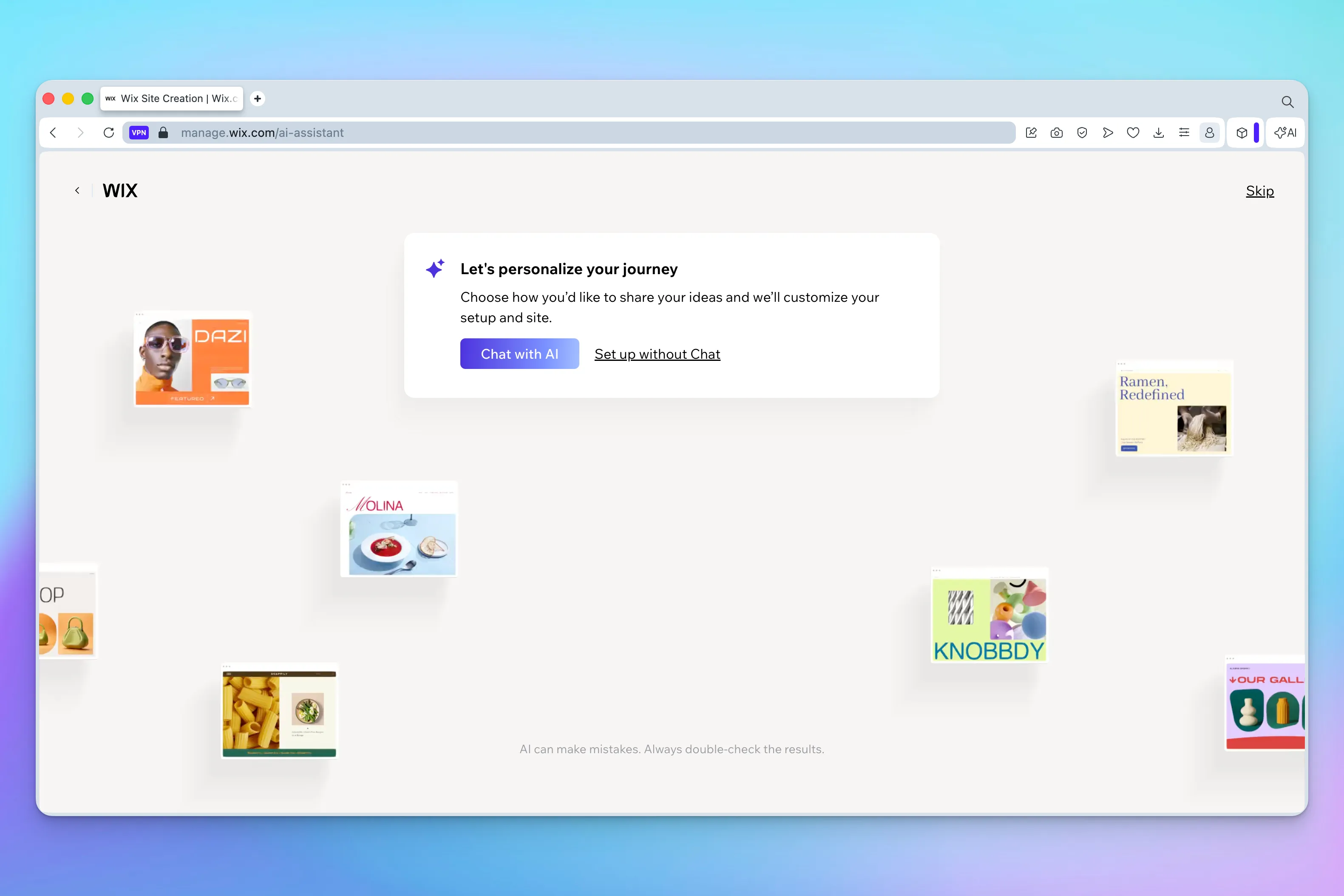
At the next step, Wix offers two routes: build the site with an AI assistant via the "Chat with AI" option, or carry on without one. Since the AI option is pushed pretty hard, I'm assuming a lot of users will go that way—so that's the one I pick for this test.
2. Building the site
A. Getting set up on Wix
The "Chat with AI" button takes me to a page where I chat with Aria, Wix's AI "web design expert." The interface is clean and pleasant enough. One small gripe: the text in the chat box is fairly small, which could bother some users.
Aria first asks me to describe my site or business. I keep it simple: "I'm a professional massage therapist."
The assistant then asks for my business name. I type in "Peter Doe's Massage." The name shows up in a preview of the site, even though the page is still nearly empty at this point.
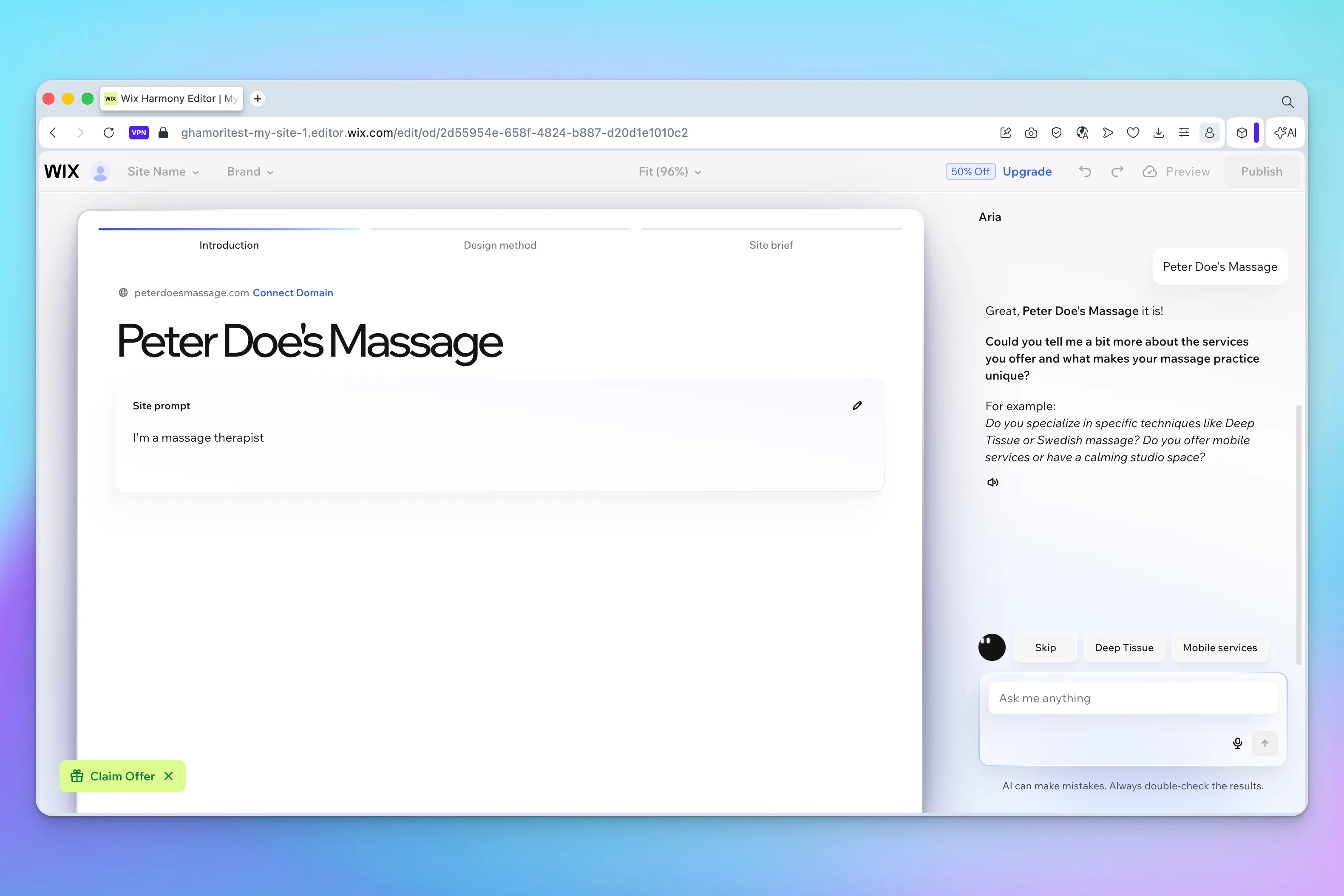
Wix then asks a more detailed question: what services do I offer, and what makes my massage practice unique? It throws out a few examples, like deep tissue or Swedish massage.
It's a fair question, it shows Wix is trying to understand the business before generating the site. But it also forces you to spell out your own offering, which isn't always obvious when you're just starting out. You already have to know which services to highlight, what to call them, and how much detail to give.
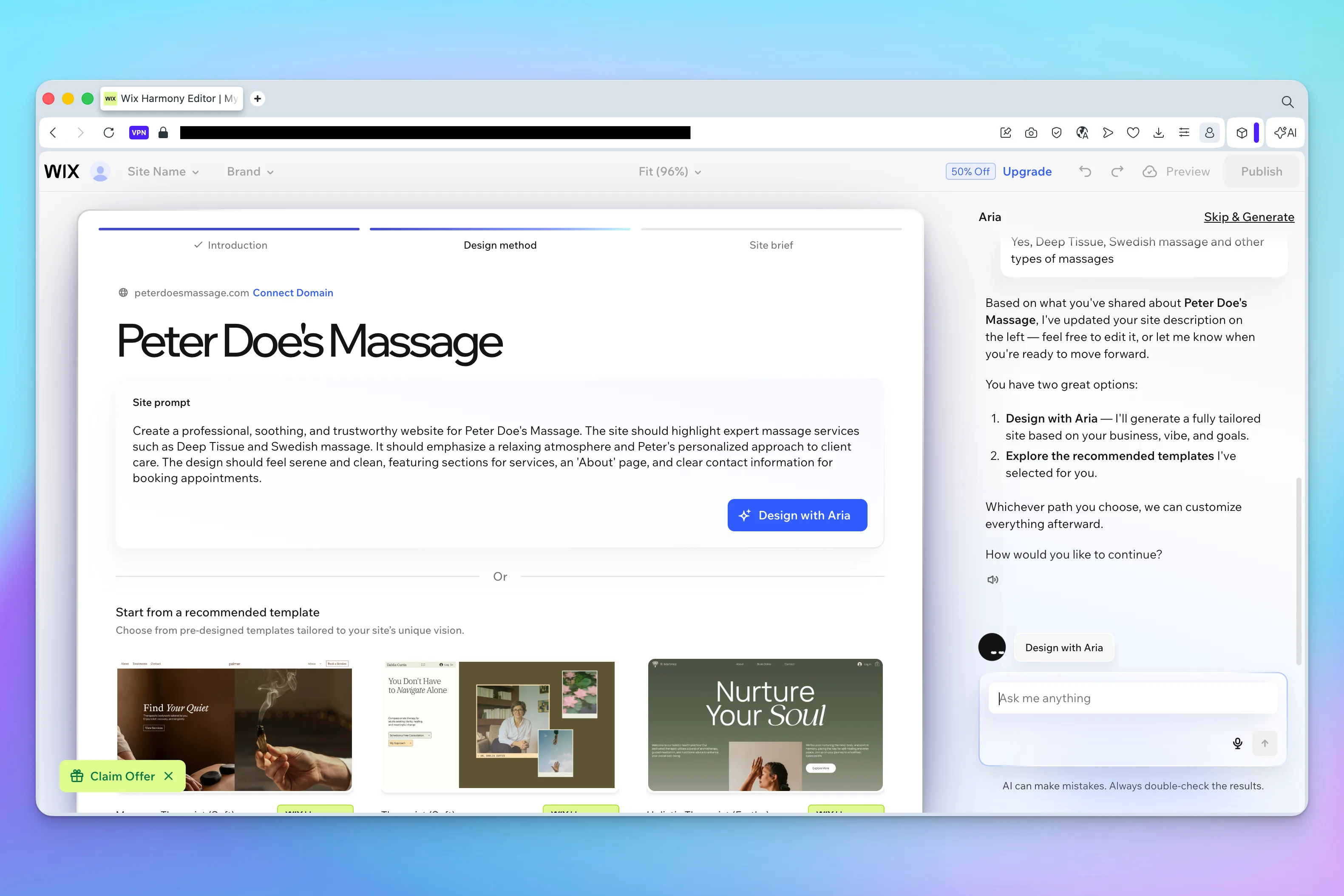
To keep the test moving, I answer: "Yes, deep tissue, Swedish massage, and other types of massages." (As we'll see later, that "other types of massages" doesn't really get picked up.)
Wix then gives me two options: let Aria generate a custom site from what I've told it, or browse a selection of recommended templates. The "Design with Aria" button is the one that stands out, so that's what I go with.
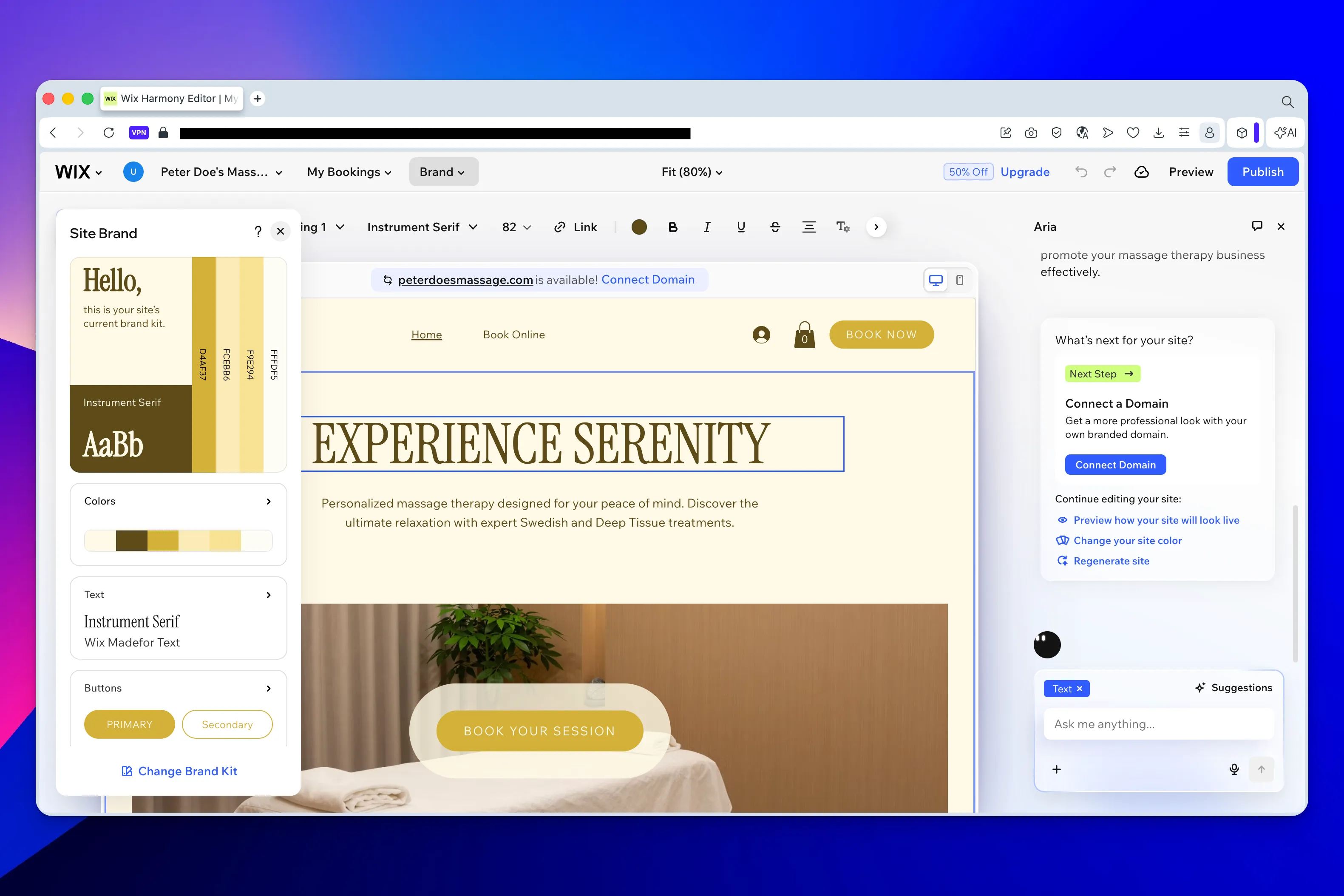
The first color palette Wix suggests is actually pretty good, coherent and easy on the eye. To test how flexible the tool is, I ask the assistant to switch to a yellow palette (my favorite color). It makes the change without a hitch. Good.
Wix then offers a few add-ons: install a booking module, buy or connect a custom domain, add certain features. For this test, I turn all of that down so I can focus purely on building the business website.
B. Building the Wix site
Here we go at last: the "Generate now" button appears and I click it. An animation spins for a minute or two while the site is built. In the meantime, Wix prompts me in the right-hand panel to enter my business details - phone number, address, email, and so on. I don't see anything for opening hours, business registration numbers, languages spoken, and the like as you get with Webfolio, but maybe that comes later.
My site finally loads. Here's my gut reaction:
The good:
The colors are nice.
The toolbar at the top of the page (for changing colors and so on) is clear.
The setup—where you select a section and then ask the chatbot to tweak it—is a neat idea too. You can tell Wix is trying to make its editor more approachable with AI.
But...
There are only 2 pages.
Only 2 types of massage are listed, with no detail at all. I'll have to add all the others myself, with their descriptions, durations, prices, and so on - which is going to take a while (once I figure out how).
The stock photos, nice as they are, don't fit at all: they show women giving massages, and I'm a man.
There's a face on the "About" page that obviously isn't mine.
Three fake testimonials are showing on the page (pleeaase, never show fake testimonials on your website!!!).
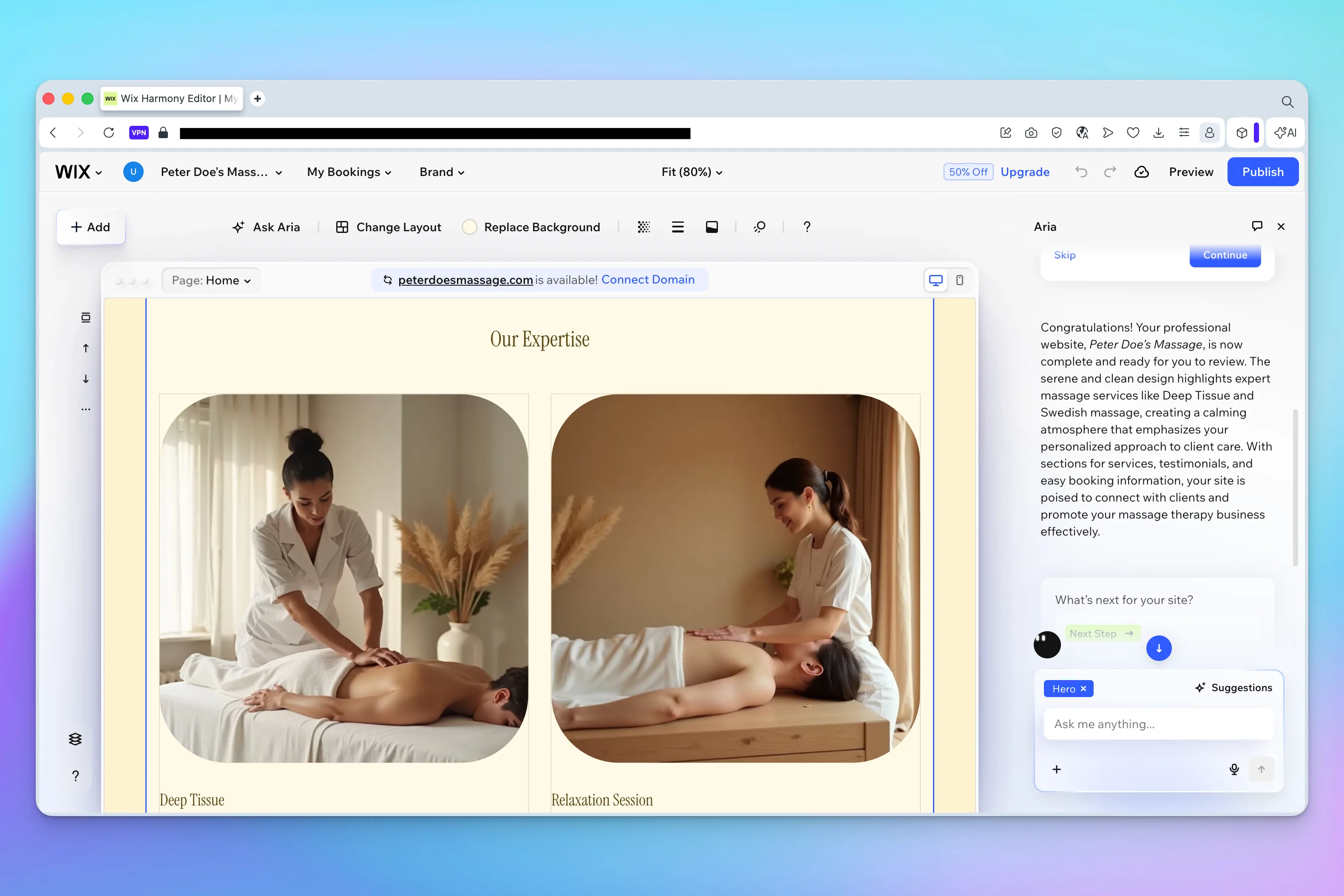
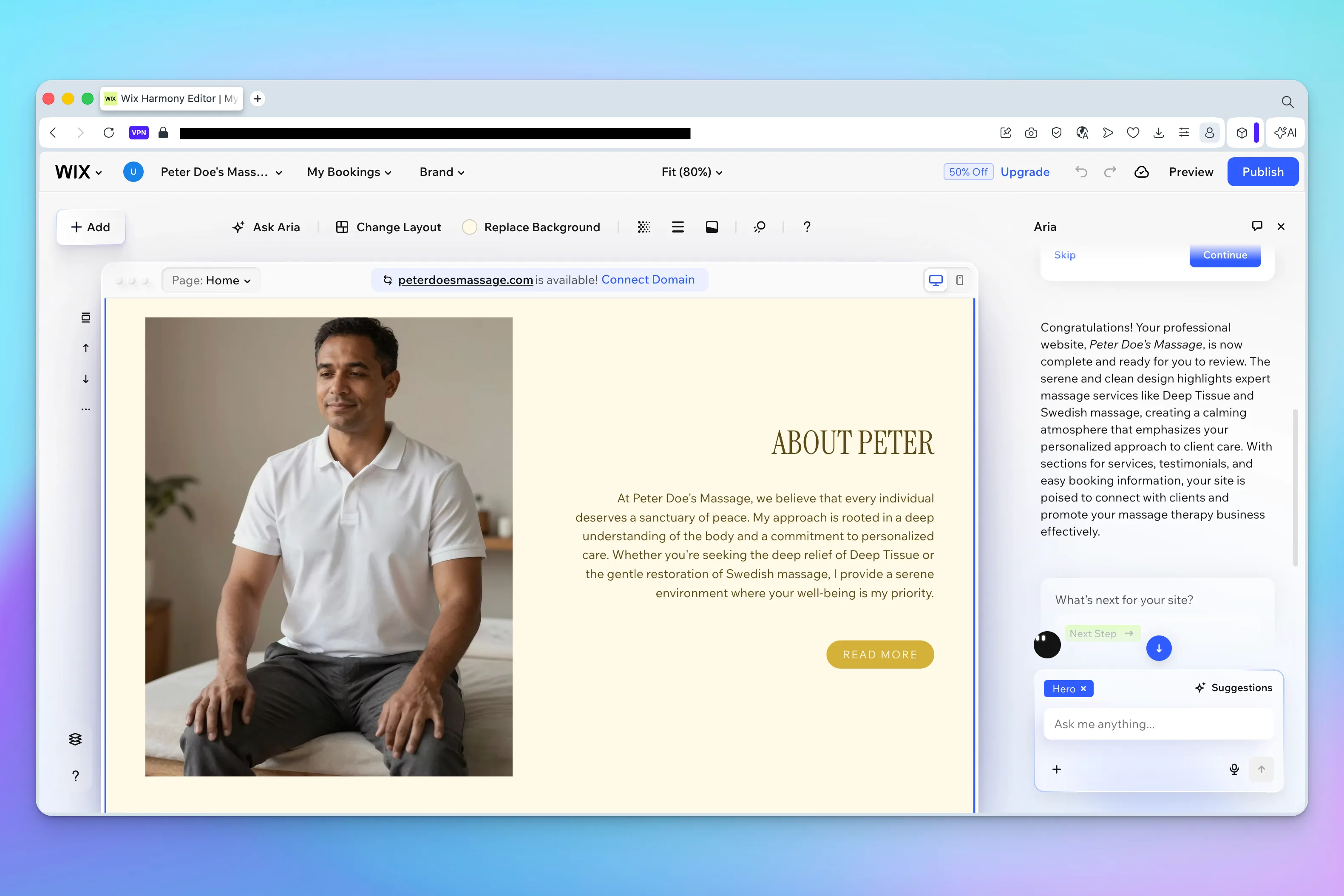
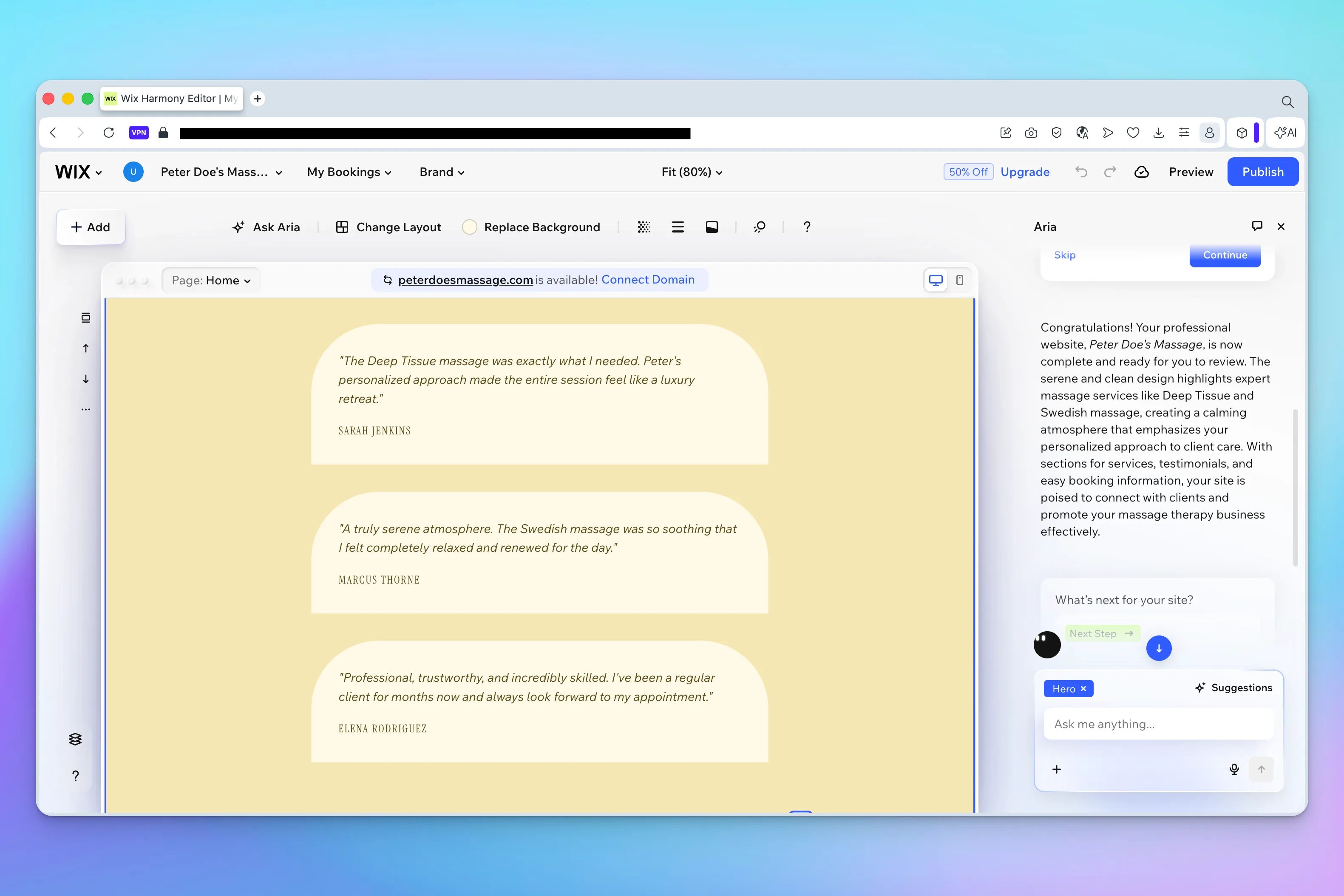
So at this stage Wix gives you an interesting visual starting point, but not a site that's actually ready to publish. To get a professional result, you still need to flesh out the content, fix the visuals, delete the fake elements, add the missing services, check the pages, and adjust the calls to action.
That's a key point in this comparison. Wix can take you a long way, but it still needs work after that first generation. Depending on how picky you are, the finishing phase can easily run to several hours - especially for someone learning the tool for the first time.
C. The Webfolio approach
Webfolio takes a radically different tack. The goal is to make every decision as easy as possible for the user, from the first step to the last. You don't have to wonder where to click, which sections or pages to create, which modules to install. You're essentially walking a marked path where, whatever you choose, your 5-page site always ends up with professional content and a professional look. Everything revolves around the type of business, the services offered, and the ways to get in touch.
So let's start building our massage therapist's site.
The first step of the questionnaire is to enter your business name and industry, and to pick a free web address say, aurastudio.webfolio.com. So I enter "Aura Body Studio" as the business name and "Massage Therapist" as the profession.
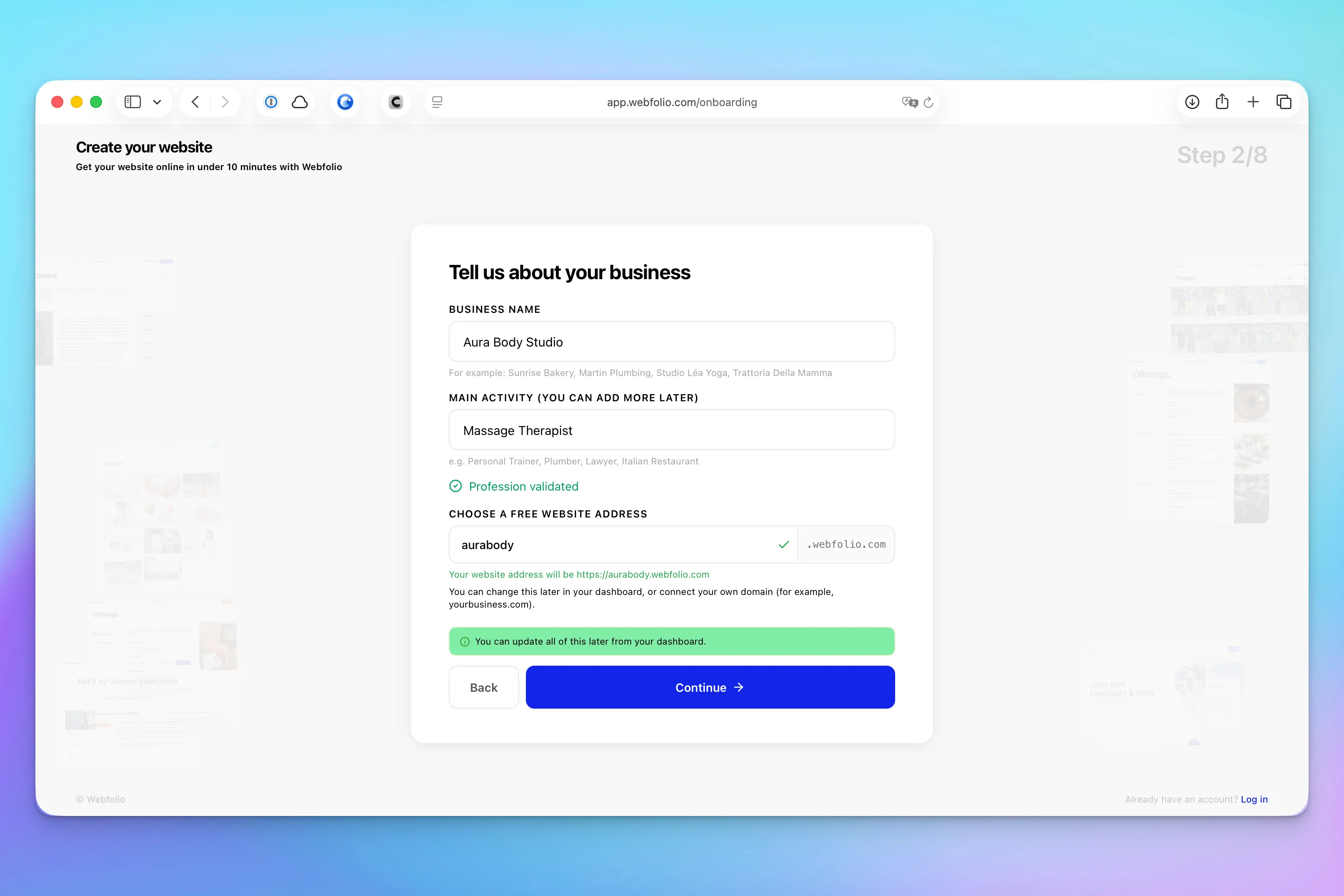
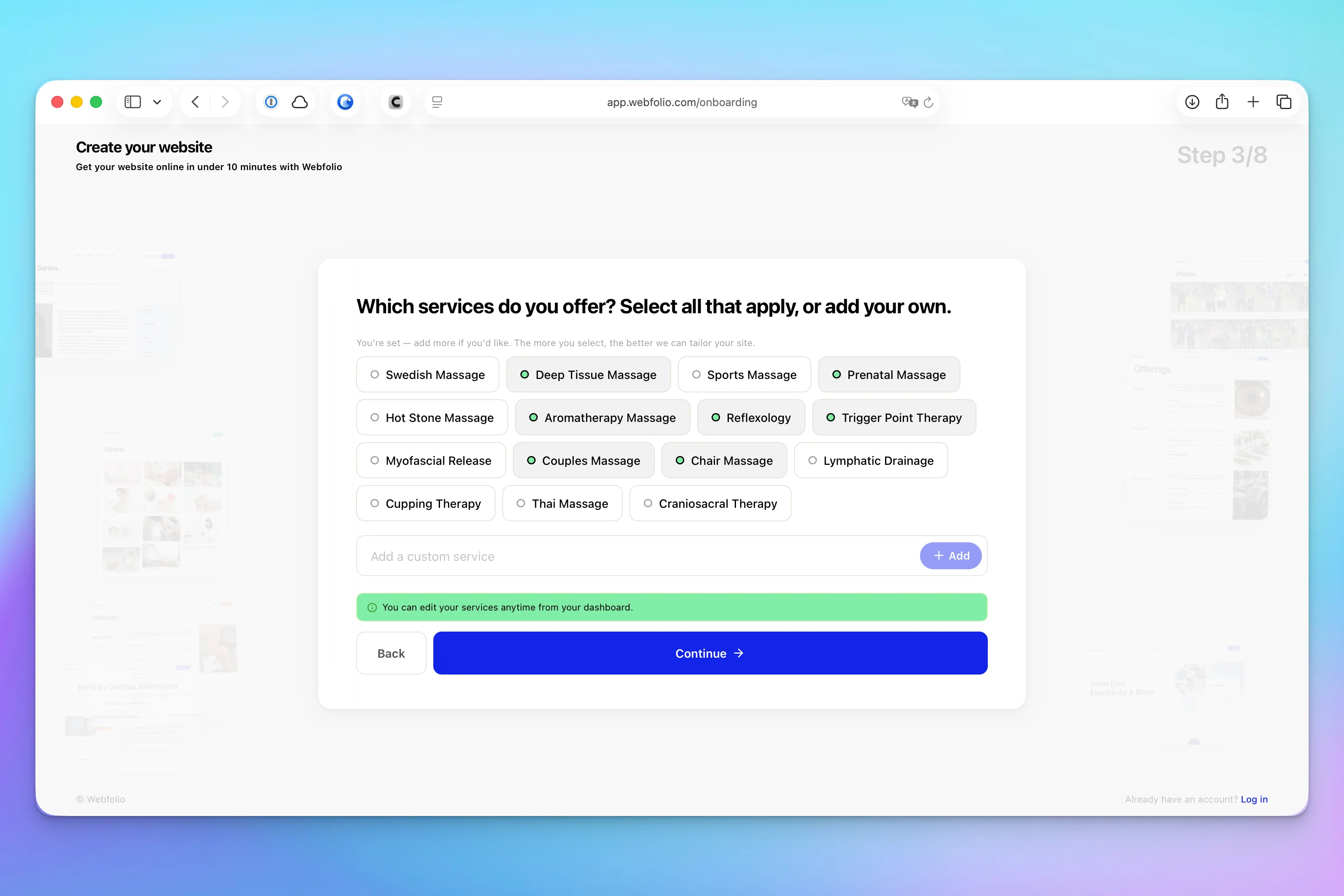
Based on that, Webfolio's built-in AI suggests, at step 2, a long list of common specialties tied to massage work: Swedish massage, chair massage, and so on. All I have to do is tick the ones that apply to me and, if I want, add others that aren't on the list (and I can add more at any time from the dashboard).
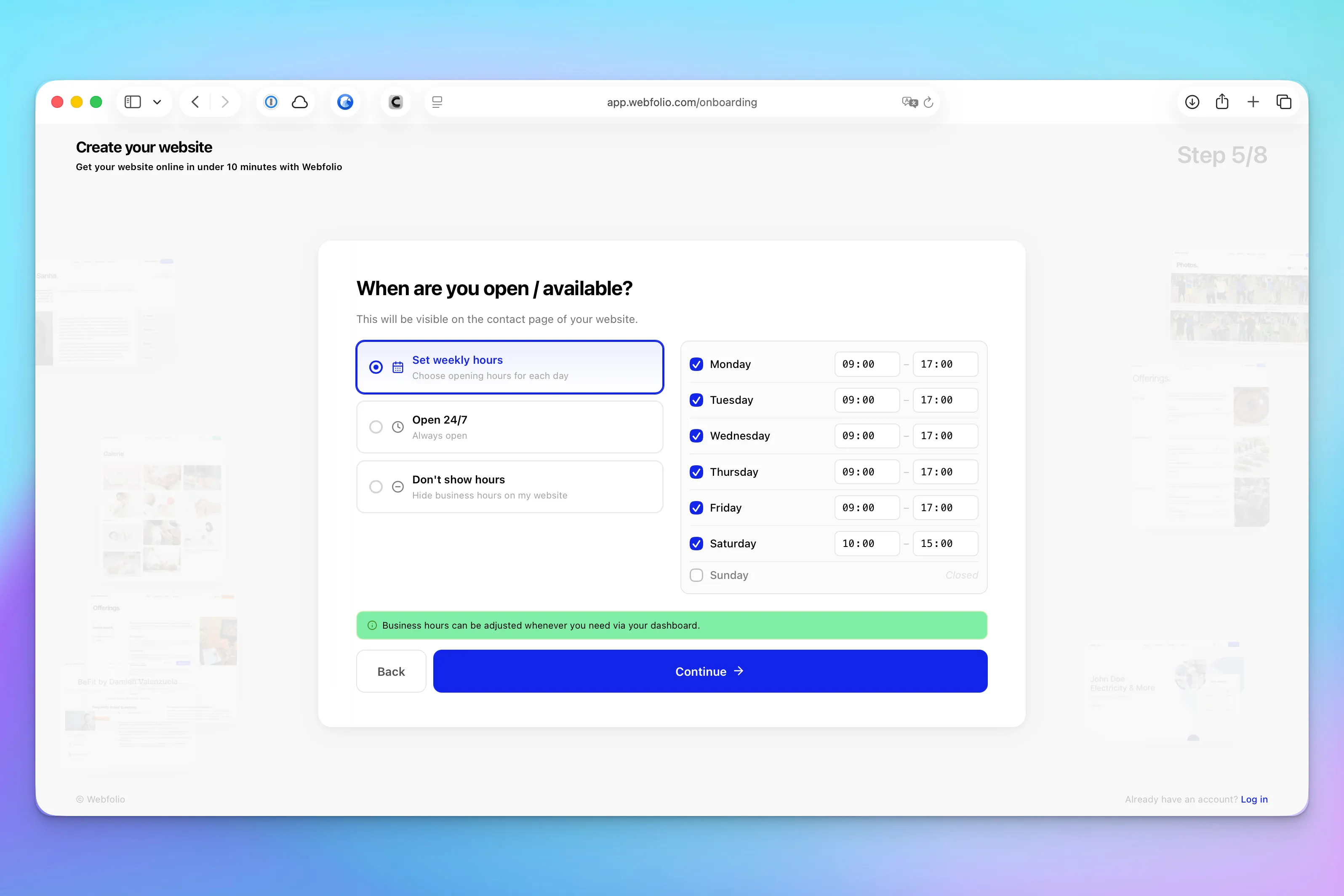
In the following steps, Webfolio asks for the contact details I want on the site (business phone, business email), my location (if relevant), and my hours (if relevant).
Finally, I'm asked to pick my site's main color and to create an account so I can reach my dashboard.
The whole thing took about 5 minutes. It's perfectly mapped out and clearly explained—there's no way to get it wrong.
From all that information, and without my even noticing, Webfolio's algorithm has generated my entire site's content in the background:
A company bio written from everything available (name, industry, services, location, and so on).
Tailored descriptions for each of the services I selected at step 2.
High-quality AI-generated illustrations.
Three "values" that fit my line of work.
A set of questions and answers for the site's FAQ section.
After about a minute, I land on my dashboard, where I'm invited to add more content or take a look at my site.
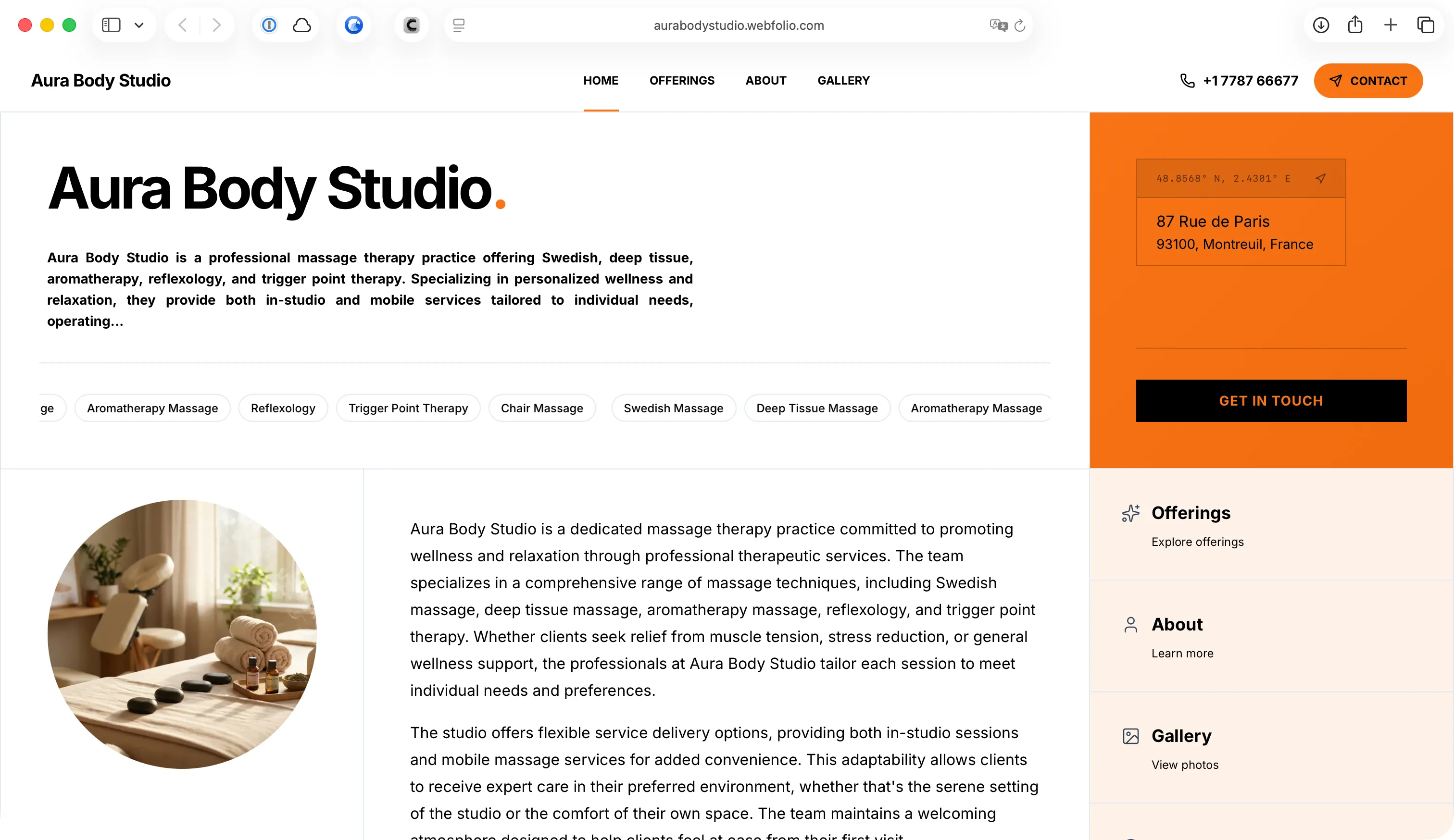
I click "View my site," and the result is genuinely impressive. My content is spread across all 5 pages (home, services, about, gallery, contact), and the whole thing looks the part.
It isn't a hyper-customized and complex site. That's not the point. What Webfolio does is let a freelancer or small business get a complete, credible business website up fast - one you can then keep improving.
In Peter the massage therapist's case, Webfolio comes out as the better fit. Where Wix hands you a base to rework, the site Webfolio builds comes together quickly: the essential pages are already there, the services are structured, the copy is in place, and the contact details are visible.
Is Webfolio a good alternative to Wix?
If you landed here searching for a Wix alternative, here's the honest answer: it depends on what you're trying to build.
People go looking for alternatives to Wix for all sorts of reasons—the editor feels like too much, the finished site needs more work than expected, the pricing tiers get confusing, or they simply don't have a weekend to spend on it. If any of that sounds familiar, Webfolio is worth a look. It strips the process down to a short questionnaire and hands you a complete, professional 5-page site in minutes.
That said, an alternative to Wix isn't always the answer. If you need a full online store, a deeply multilingual site, or pixel-level control over every element, Wix is still the stronger tool, and we'd point you back to it. Webfolio is the better alternative specifically for freelancers, tradespeople, and small businesses who want a clean business website without the learning curve.
Pricing
At the time of this test, Wix offers 4 main plans:
Light: €14/month
Core: €25/month
Business: €34/month
Business Plus: €149/month
The advanced tools (e-commerce, online payments, a booking platform, and so on) mostly kick in from the €25/month plan up. Wix also has a free version, with limited features.
Webfolio, for its part, has a single all-in plan at €14.95/month.
What Webfolio doesn't do (and why that's a good thing)
Let's be clear: Webfolio isn't an all-purpose tool, and that's by design. If you're looking to:
Launch a complex online store with 500 products, multi-warehouse inventory, and advanced sales funnels,
Build a serious multilingual site with content tailored to each market,
Create a 50-page site with a custom site map,
Control every visual detail down to the pixel,
…then Wix (or Shopify for e-commerce) is the better choice.
Webfolio is built for a specific audience: freelancers, tradespeople, independent professionals, and small businesses who want a professional website that works straight away—without learning a new tool or spending a whole weekend on it. If that's you, you'll save a serious amount of time. If it isn't, better to know now.
Conclusion
Wix and Webfolio take fundamentally different approaches to building a website.
Wix is a big, well-oiled machine and a global leader, packed with options for anyone who wants a site customized in every detail. Those willing to put in the time can reach genuinely high-quality results. Whatever the goal - online sales or bookings, marketing, you name it - Wix has a wealth of modules to plug in, and it's a solid alternative for an online store too, much like Shopify.
But as this test shows, for anyone who doesn't have the time, the inclination, or the know-how to dig through all of Wix's features—creating multiple pages, dropping the right sections into each one, and so on—it's far simpler and faster to get a quality, ready-to-go site with Webfolio.
With Webfolio, it took under 7 minutes to get a first 5-page site (home, services, about, gallery, contact), with 10 types of massage listed on the "Services" page, each with its own description and duration. The "About" page was filled out automatically with a solid company bio, thanks to our context-aware AI working in the background, and the contact details turn up in several strategic spots around the site.
Webfolio is a website builder designed from the ground up for the freelancers, tradespeople, consultants, coaches, therapists, service providers, and small businesses who want to be visible online without spending hours building their site.
So choose based on what you need. If you want maximum control and advanced features, stick with Wix. If you've been searching for a simpler alternative to Wix—one that gets a professional business website live in minutes—Webfolio is built for exactly that. Both are excellent tools; they're just made for different people.
Want to try it?
Launch your professional business website in under 7 minutes with Webfolio. No credit card needed to get started.
Share article
Create your website
with Webfolio.
Start your trial and see how easy it is to create a professional website and attract new clients.
Free trial - No credit card required
“If anything in this article raised a question, I'd love to hear from you. There's no marketing team between you and us — write to hello(@)webfolio.com and you'll get a reply from a member of our team.”

Gregory
Founder and Lead Designer
Insight
Webfolio vs. Wix: A Simpler Alternative to Wix for a Professional Business Website
Effective collaboration is the backbone of any successful team, but too often, it’s slowed down by disconnected tools, endless email threads, and scattered information. Read on to learn more.
Looking for an alternative to Wix to build a professional business website fast? Wix is the obvious name everyone reaches for first—but it isn't the only option, and for plenty of people it isn't the best one. We put Wix head to head with Webfolio, one of the more focused Wix alternatives out there, on a real-world project, stopwatch running, feeding both the exact same starting information to see what each one delivered.
The short version, for anyone in a hurry:
If you want full control down to the pixel, plan to sell online, need advanced features, and have a few hours to spend → Wix.
If you want a professional site in under 10 minutes without having to think about structure, content, or design → Webfolio.
For everyone else, the full test is right below.
The comparison at a glance
Wix | Webfolio | |
|---|---|---|
Main goal | A highly customized, scalable site with advanced features | A clean, fast business website that's ready to go |
Who it's for | People who want to control the design and the features | Freelancers, tradespeople, local professionals, small businesses |
Initial build time | Quick to spin up a base, but the finishing takes longer | Roughly 5 to 7 minutes for a complete first version |
Pages produced in our test | 2 pages | 5 pages |
Industry-specific content | You fill it in and adjust it yourself | Generated automatically from your line of work |
Services listed | A few services shown, but thin on detail | Structured services with descriptions (plus duration and pricing where relevant) |
Images | Look good, but sometimes don't fit the actual job | Generated to match the site |
Customization | Very high | More guided |
Complexity | Richer, but takes more time | Simpler and more hand-held |
Pricing | €14/month (Light) | €14.95/month (all-in) |
Main drawback | Can need a lot of finishing work | Less suited to very specific projects |
The test: building a site for Peter Doe, a massage therapist in Paris
Full disclosure: we're Webfolio, we know Wix well, and we love the platform. We happily recommend it to people who are comfortable with tech, have time on their hands, and want a site they can fine-tune in every detail with advanced features. But like any tool, Wix has its audience, and it isn't necessarily the best fit for everyone building a website - which is exactly why so many people start hunting for a Wix alternative in the first place. The best way to show where each tool shines is with a concrete example.
Picture Peter Doe, a massage therapist who's just set up shop in Paris. He doesn't want to spend a big budget on his site, has no real idea what it should look like - beyond the fact that he likes yellow - and just wants the site to say who he is, list the types of massage he offers along with their prices, and of course explain how to get in touch. In short, Peter wants a nice-looking website to get his business off the ground.
So let's compare Wix and Webfolio step by step as we build his site.
1. Setting up an account
On Wix
Building a Wix site starts with creating an account: you enter your email address and a password. One thing to watch, though—with Wix, the part of your email before the "@" becomes your site's web address by default, which can be a problem. Enter peter-doe-1989@gmail.com, for example, and your Wix address becomes peter-doe-1989.wixsite.com, unless you change it later or connect your own domain name. Personally, I'd have preferred my site's address to be based on my business name, the way it works with Webfolio.
Wix then asks whether I'm building a site for myself or for a client, as an agency or freelancer. In this case, I click "Create a site for myself."
At the next step, Wix offers two routes: build the site with an AI assistant via the "Chat with AI" option, or carry on without one. Since the AI option is pushed pretty hard, I'm assuming a lot of users will go that way—so that's the one I pick for this test.
2. Building the site
A. Getting set up on Wix
The "Chat with AI" button takes me to a page where I chat with Aria, Wix's AI "web design expert." The interface is clean and pleasant enough. One small gripe: the text in the chat box is fairly small, which could bother some users.
Aria first asks me to describe my site or business. I keep it simple: "I'm a professional massage therapist."
The assistant then asks for my business name. I type in "Peter Doe's Massage." The name shows up in a preview of the site, even though the page is still nearly empty at this point.
Wix then asks a more detailed question: what services do I offer, and what makes my massage practice unique? It throws out a few examples, like deep tissue or Swedish massage.
It's a fair question, it shows Wix is trying to understand the business before generating the site. But it also forces you to spell out your own offering, which isn't always obvious when you're just starting out. You already have to know which services to highlight, what to call them, and how much detail to give.
To keep the test moving, I answer: "Yes, deep tissue, Swedish massage, and other types of massages." (As we'll see later, that "other types of massages" doesn't really get picked up.)
Wix then gives me two options: let Aria generate a custom site from what I've told it, or browse a selection of recommended templates. The "Design with Aria" button is the one that stands out, so that's what I go with.
The first color palette Wix suggests is actually pretty good, coherent and easy on the eye. To test how flexible the tool is, I ask the assistant to switch to a yellow palette (my favorite color). It makes the change without a hitch. Good.
Wix then offers a few add-ons: install a booking module, buy or connect a custom domain, add certain features. For this test, I turn all of that down so I can focus purely on building the business website.
B. Building the Wix site
Here we go at last: the "Generate now" button appears and I click it. An animation spins for a minute or two while the site is built. In the meantime, Wix prompts me in the right-hand panel to enter my business details - phone number, address, email, and so on. I don't see anything for opening hours, business registration numbers, languages spoken, and the like as you get with Webfolio, but maybe that comes later.
My site finally loads. Here's my gut reaction:
The good:
The colors are nice.
The toolbar at the top of the page (for changing colors and so on) is clear.
The setup—where you select a section and then ask the chatbot to tweak it—is a neat idea too. You can tell Wix is trying to make its editor more approachable with AI.
But...
There are only 2 pages.
Only 2 types of massage are listed, with no detail at all. I'll have to add all the others myself, with their descriptions, durations, prices, and so on - which is going to take a while (once I figure out how).
The stock photos, nice as they are, don't fit at all: they show women giving massages, and I'm a man.
There's a face on the "About" page that obviously isn't mine.
Three fake testimonials are showing on the page (pleeaase, never show fake testimonials on your website!!!).
So at this stage Wix gives you an interesting visual starting point, but not a site that's actually ready to publish. To get a professional result, you still need to flesh out the content, fix the visuals, delete the fake elements, add the missing services, check the pages, and adjust the calls to action.
That's a key point in this comparison. Wix can take you a long way, but it still needs work after that first generation. Depending on how picky you are, the finishing phase can easily run to several hours - especially for someone learning the tool for the first time.
C. The Webfolio approach
Webfolio takes a radically different tack. The goal is to make every decision as easy as possible for the user, from the first step to the last. You don't have to wonder where to click, which sections or pages to create, which modules to install. You're essentially walking a marked path where, whatever you choose, your 5-page site always ends up with professional content and a professional look. Everything revolves around the type of business, the services offered, and the ways to get in touch.
So let's start building our massage therapist's site.
The first step of the questionnaire is to enter your business name and industry, and to pick a free web address say, aurastudio.webfolio.com. So I enter "Aura Body Studio" as the business name and "Massage Therapist" as the profession.
Based on that, Webfolio's built-in AI suggests, at step 2, a long list of common specialties tied to massage work: Swedish massage, chair massage, and so on. All I have to do is tick the ones that apply to me and, if I want, add others that aren't on the list (and I can add more at any time from the dashboard).
In the following steps, Webfolio asks for the contact details I want on the site (business phone, business email), my location (if relevant), and my hours (if relevant).
Finally, I'm asked to pick my site's main color and to create an account so I can reach my dashboard.
The whole thing took about 5 minutes. It's perfectly mapped out and clearly explained—there's no way to get it wrong.
From all that information, and without my even noticing, Webfolio's algorithm has generated my entire site's content in the background:
A company bio written from everything available (name, industry, services, location, and so on).
Tailored descriptions for each of the services I selected at step 2.
High-quality AI-generated illustrations.
Three "values" that fit my line of work.
A set of questions and answers for the site's FAQ section.
After about a minute, I land on my dashboard, where I'm invited to add more content or take a look at my site.
I click "View my site," and the result is genuinely impressive. My content is spread across all 5 pages (home, services, about, gallery, contact), and the whole thing looks the part.
It isn't a hyper-customized and complex site. That's not the point. What Webfolio does is let a freelancer or small business get a complete, credible business website up fast - one you can then keep improving.
In Peter the massage therapist's case, Webfolio comes out as the better fit. Where Wix hands you a base to rework, the site Webfolio builds comes together quickly: the essential pages are already there, the services are structured, the copy is in place, and the contact details are visible.
Is Webfolio a good alternative to Wix?
If you landed here searching for a Wix alternative, here's the honest answer: it depends on what you're trying to build.
People go looking for alternatives to Wix for all sorts of reasons—the editor feels like too much, the finished site needs more work than expected, the pricing tiers get confusing, or they simply don't have a weekend to spend on it. If any of that sounds familiar, Webfolio is worth a look. It strips the process down to a short questionnaire and hands you a complete, professional 5-page site in minutes.
That said, an alternative to Wix isn't always the answer. If you need a full online store, a deeply multilingual site, or pixel-level control over every element, Wix is still the stronger tool, and we'd point you back to it. Webfolio is the better alternative specifically for freelancers, tradespeople, and small businesses who want a clean business website without the learning curve.
Pricing
At the time of this test, Wix offers 4 main plans:
Light: €14/month
Core: €25/month
Business: €34/month
Business Plus: €149/month
The advanced tools (e-commerce, online payments, a booking platform, and so on) mostly kick in from the €25/month plan up. Wix also has a free version, with limited features.
Webfolio, for its part, has a single all-in plan at €14.95/month.
What Webfolio doesn't do (and why that's a good thing)
Let's be clear: Webfolio isn't an all-purpose tool, and that's by design. If you're looking to:
Launch a complex online store with 500 products, multi-warehouse inventory, and advanced sales funnels,
Build a serious multilingual site with content tailored to each market,
Create a 50-page site with a custom site map,
Control every visual detail down to the pixel,
…then Wix (or Shopify for e-commerce) is the better choice.
Webfolio is built for a specific audience: freelancers, tradespeople, independent professionals, and small businesses who want a professional website that works straight away—without learning a new tool or spending a whole weekend on it. If that's you, you'll save a serious amount of time. If it isn't, better to know now.
Conclusion
Wix and Webfolio take fundamentally different approaches to building a website.
Wix is a big, well-oiled machine and a global leader, packed with options for anyone who wants a site customized in every detail. Those willing to put in the time can reach genuinely high-quality results. Whatever the goal - online sales or bookings, marketing, you name it - Wix has a wealth of modules to plug in, and it's a solid alternative for an online store too, much like Shopify.
But as this test shows, for anyone who doesn't have the time, the inclination, or the know-how to dig through all of Wix's features—creating multiple pages, dropping the right sections into each one, and so on—it's far simpler and faster to get a quality, ready-to-go site with Webfolio.
With Webfolio, it took under 7 minutes to get a first 5-page site (home, services, about, gallery, contact), with 10 types of massage listed on the "Services" page, each with its own description and duration. The "About" page was filled out automatically with a solid company bio, thanks to our context-aware AI working in the background, and the contact details turn up in several strategic spots around the site.
Webfolio is a website builder designed from the ground up for the freelancers, tradespeople, consultants, coaches, therapists, service providers, and small businesses who want to be visible online without spending hours building their site.
So choose based on what you need. If you want maximum control and advanced features, stick with Wix. If you've been searching for a simpler alternative to Wix—one that gets a professional business website live in minutes—Webfolio is built for exactly that. Both are excellent tools; they're just made for different people.
Want to try it?
Launch your professional business website in under 7 minutes with Webfolio. No credit card needed to get started.